6.5. Performance Benchmark Tools
This section introduces the performance benchmark tools, their purpose, and the metrics they help measure.
6.5.1. common_benchmark_node.py
common_benchmark_node.py monitors Orbbec camera performance in a ROS environment. It collects and records key camera metrics such as frame rate, latency, system resource usage, and packet/drop rate to help evaluate camera node stability and performance. Statistics are updated once per second.
Features:
Measures published image frame rate and latency (current, minimum, maximum, and average).
Monitors camera node CPU/ARM usage (current, minimum, maximum, and average).
Tracks frame drop rate (publisher) and packet loss rate (subscriber).
Prints real-time statistics at 1 Hz and saves results to a CSV file.
Supports configurable runtime and CSV output path.
In ROS 1, both frame drop rate and packet loss rate can be measured. In ROS 2, the header does not contain the seq field, so only publisher-side frame drop rate is calculated.
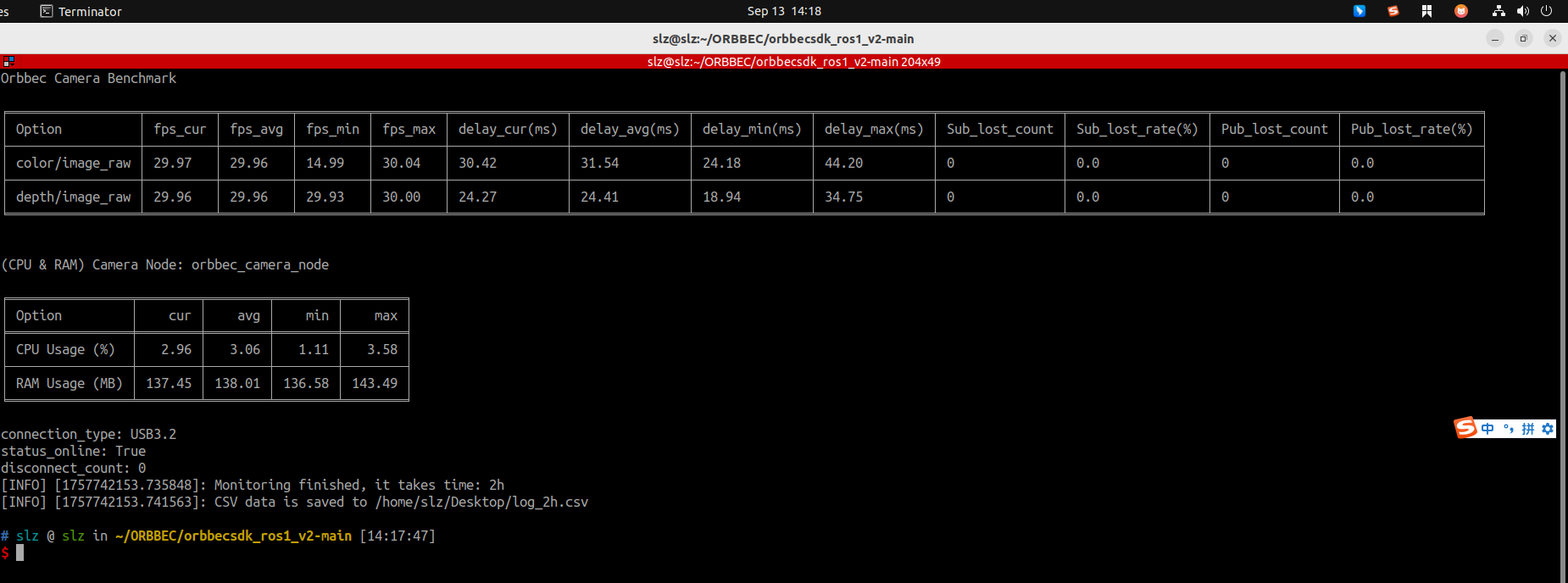
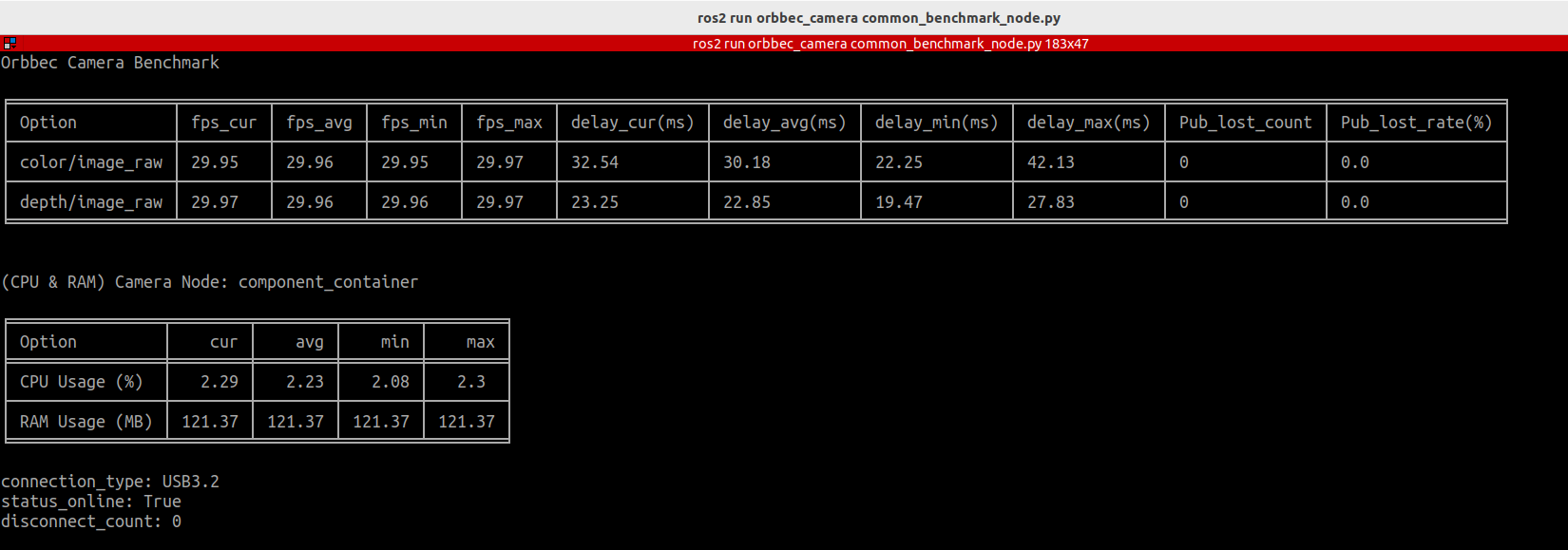
Run example:
ros2 run orbbec_camera common_benchmark_node.py \
    --run_time 2h  \
    --csv_file /path/to/log.csv
Parameters:
--run_time: Monitoring duration, specified as a time string such as"10s","5m","1h", or"2d". The default is 10 seconds.--csv_file: Output CSV file path. By default, it is saved in the workspace directory ascamera_monitor_log.csv.
Multi-camera monitoring example:
ros2 run orbbec_camera common_benchmark_node.py \
--run_time 1h \
--csv_file /tmp/cam_log.csv \
--camera_names camera_01,camera_02
6.5.2. service_benchmark_node.py
service_benchmark_node monitors service call performance. It measures service call success rate and execution time.
Features:
Benchmarks a single service call and measures latency and success rate.
Benchmarks multiple services defined in a YAML configuration file.
Can save benchmark results to a CSV file.
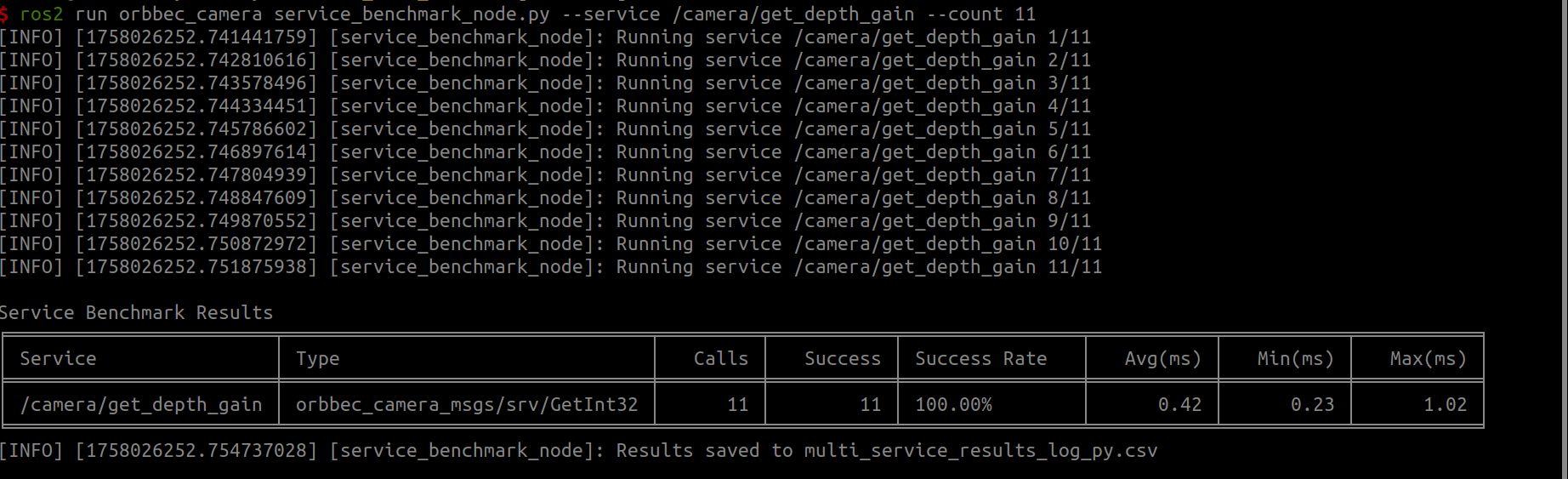
When collecting data for multiple services, using a CSV file is recommended for analysis.
6.5.2.1. ROS2 C++
Single service benchmark:
ros2 run orbbec_camera service_benchmark_node \
    --ros-args \
    -p service_name:=/camera/get_depth_gain \
    -p service_type:=orbbec_camera_msgs/srv/GetInt32 \
    -p count:=10
Multiple service benchmark (YAML configuration):
ros2 run orbbec_camera service_benchmark_node \
    --ros-args \
    -p yaml_file:=/path/to/default_service.yaml
6.5.2.2. ROS2 Python
Single service benchmark:
ros2 run orbbec_camera service_benchmark_node.py --service /camera/get_depth_gain --count 10
Multiple service benchmark (YAML configuration):
ros2 run orbbec_camera service_benchmark_node.py --yaml_file /path/to/default_service.yaml
Example YAML configuration is available at orbbec_camera/scripts/default_service.yaml:
default_count: 10

services:
- name: /camera/get_auto_white_balance
  type: orbbec_camera_msgs/srv/GetInt32
- name: /camera/get_color_exposure
  type: orbbec_camera_msgs/srv/GetInt32
- name: /camera/get_color_gain
  type: orbbec_camera_msgs/srv/GetInt32
- name: /camera/get_depth_exposure
  type: orbbec_camera_msgs/srv/GetInt32
- name: /camera/get_depth_gain
  type: orbbec_camera_msgs/srv/GetInt32
- name: /camera/get_device_info
  type: orbbec_camera_msgs/srv/GetDeviceInfo
- name: /camera/send_software_trigger
  type: std_srvs/srv/SetBool
  request: {data: false}
- name: /camera/set_auto_white_balance
  type: std_srvs/srv/SetBool
  request: {data: false}
- name: /camera/set_color_ae_roi
  type: orbbec_camera_msgs/srv/SetArrays
  request: {data_param: [0,1279,0,719]}
- name: /camera/set_color_auto_exposure
  type: std_srvs/srv/SetBool
  request: {data: false}
- name: /camera/set_color_exposure
  type: orbbec_camera_msgs/srv/SetInt32
  request: {data: 30}
- name: /camera/set_color_flip
  type: std_srvs/srv/SetBool
  request: {data: false}
- name: /camera/set_color_gain
  type: orbbec_camera_msgs/srv/SetInt32
  request: {data: 20}
- name: /camera/set_color_mirror
  type: std_srvs/srv/SetBool
  request: {data: false}
- name: /camera/set_color_rotation
  type: orbbec_camera_msgs/srv/SetInt32
  request: {data: 90}
- name: /camera/set_depth_ae_roi
  type: orbbec_camera_msgs/srv/SetArrays
  request: {data_param: [0,1279,0,719]}
- name: /camera/set_depth_auto_exposure
  type: std_srvs/srv/SetBool
  request: {data: false}
- name: /camera/set_depth_exposure
  type: orbbec_camera_msgs/srv/SetInt32
  request: {data: 3000}
- name: /camera/set_depth_flip
  type: std_srvs/srv/SetBool
  request: {data: false}
- name: /camera/set_depth_gain
  type: orbbec_camera_msgs/srv/SetInt32
  request: {data: 200}
6.5.3. ob_benchmark_node
This tool benchmarks the performance of different OrbbecSDK_ROS2 camera configurations. Benchmark results depend on the camera and settings used. It currently only applies to ROS 2 Humble.
Example usage code is available in example.
6.5.3.1. Tool Configuration
The configuration file is orbbec_camera/config/tools/startbenchmark/start_benchmark_params.json.
{
    "start_benchmark_params": {
        "camera_name": [
            "camera_01",
            "camera_02",
            "camera_03",
            "camera_04"
        ],
        "process_name": "component_conta",
        "switch_cycle": 300,
        "test_cycle": 1,
        "skip_number": 30
    }
}
camera_name: Camera names to configure, such as"camera_01"or"camera_02".process_name: Process name to monitor. For example,"component_conta"monitors the container process data.switch_cycle: Configuration switch interval in seconds. For example,300means the configuration switches every 300 seconds.test_cycle: Test interval in seconds. For example,1means the tool collects monitored process data every second.skip_number: Number of data points to skip. For example,30means the first 30 data points are ignored.
6.5.3.2. Camera Configuration (Launch Files)
The launch folder contains multiple .launch.py files (ob_benchmark_0.launch.py, ob_benchmark_1.launch.py, …, ob_benchmark_19.launch.py). Each file corresponds to a different camera configuration.
6.5.3.3. Run ob_benchmark
source install/setup.bash
ros2 run orbbec_camera ob_benchmark_node
6.5.3.4. Output Data Files
Output data files are stored in the ob_benchmark folder with names such as 0.csv, 1.csv, …, 19.csv.
0.csvcontains data from theob_benchmark_0.launch.pyconfiguration.1.csvcontains data from theob_benchmark_1.launch.pyconfiguration.
6.5.4. start_benchmark_node
start_benchmark_node is the subscriber used in the benchmark workflow. It subscribes to multi-camera color, depth, IR, and point cloud topics according to camera_name in start_benchmark_params.json. It is usually used together with benchmark launch files.
ros2 run orbbec_camera start_benchmark_node